Agent Copilot
Agent Copilot helps customer service agents resolve cases faster by surfacing relevant information, drafting responses, recommending next steps, and handling routine work like documentation.
I am the solo designer on Agent Copilot at Sprinklr. I design the (human) agent-facing experience used during live customer cases and the admin tools used for configurations. I collaborate with designers across Sprinklr's other copilots to keep patterns consistent across the platform.
Impact
- 64% decrease in Average Handling Time (AHT) for a global Fortune 500 brand on copilot-assisted cases.
- Adopted by 6 major brands and 3,000+ agents in the first year.
Agents have to manage a lot of work around a customer case
To resolve a case, an agent has to understand the customer's problem, find the right information, respond clearly, take any required action, and document the case. The information needed is spread across customer history, knowledge articles, previous cases, and external documentation.
Opportunity: bring AI-assistance into the flow of a case
Agent copilot gathers relevant context, generates or recommends responses and next steps, and helps complete routine tasks. The agent reviews its work, applies judgement, and stays focused on the customer interaction.
Understanding stakeholder goals
Designing around a live customer conversation
Unlike in most consumer AI products, where a user interacts directly with an AI tool, Agent Copilot is not the user's primary conversation in customer service. The customer is. Copilot is adding a second interaction to a live conversation between two people.
This made attention a central design constraint here. Copilot needed to support the customer conversation without competing with it, staying ambient and non-intrusive until it has something relevant to contribute or is invoked by the user.
Design goals
- Increase speed of resolution Reduce steps between a customer message and an informed response or action on it.
- Make outputs verifiable before use Help agents verify Copilot’s work before it enters the customer conversation.
Copilot starts with existing case context
Proactively summarizes the case and suggests a response
When a new case arrives, the agent first needs to understand what has already happened, identify the customer’s problem, and greet them, usually with a canned response.
Since the case already contains this information, Copilot uses it to prepare a summary and suggested response. I designed the response template to show these in a clean, scannable format, with relevant actions below each block.
Scopes knowledge retrieval with context tags
Large enterprises have huge knowledge bases that span sub-brands, product lines, regions, etc. When a case is assigned, Copilot uses the case metadata to add context tags to the composer.
This scopes the retrieval parameters for Copilot. Agents remain in control and they can change or remove these tags as needed.
I gave these category tags a dropdown so agents can switch a value without having to delete and re-add. The tags sit above the input rather than inline with the prompt for two reasons:
- Context typically remains the same throughout a case. Unlike how context tags behave in products like cursor, claude code etc, these tags persist.
- The agent cannot accidentally delete context tags while editing a prompt.
Sometimes, a case conversation might be long, where multiple topics are discussed. For such cases, agents can manually add particular messages as context. This was added based on customer feedback for more granular control on context and queries.
For this pattern, Cursor's interface was a key inspiration for me. I adapted their preview pattern so the agent can verify the message(s) added as context.
Out-of-box prompts
The prompt bar has common prompts such as "summarize case", "answer customer query" to give agents one-click action for repetitive tasks. This is widely used by agents across our brand customers.
We designed the prompt bar such that overflow of prompts goes into a dropdown with a search bar. This was another decision in favor of speed and ease of discovery.
Because the prompts compete for space, I designed a toggle for agents to show/hide these, giving them greater control over their limited workspace.
Agents can easily verify copilot's sources
Using inline citations
Agents need to verify output from copilot before using it in a customer response. I kept citations inline so each statement is easily verifiable against its source.
I've noticed that some consumer chat interfaces group sources at the end of a response, but for customer service, that would add an extra step: the agent would have to determine which source supported which statement from copilot.
Identifying canned vs generated response easily
Copilot can recommend a canned response (pre-defined responses authored by brands) or generate a new one. Even though trust in AI models (and in turn in Copilot) is improving, many brands are still hesitant about agents using AI-generated responses.
So I labeled that difference clearly in the response header. There was some discussion to create separate components for the two response types, but as models improve, I foresee agents using the best suited response, whether canned or generated. A visual split could hardcode a temporary difference in trust into the UI and make it harder to change in the future.
Copilot prepares the next action for review
Speeding up after-call documentation
The next phase of product development moved copilot beyond surfacing information and toward preparing work.
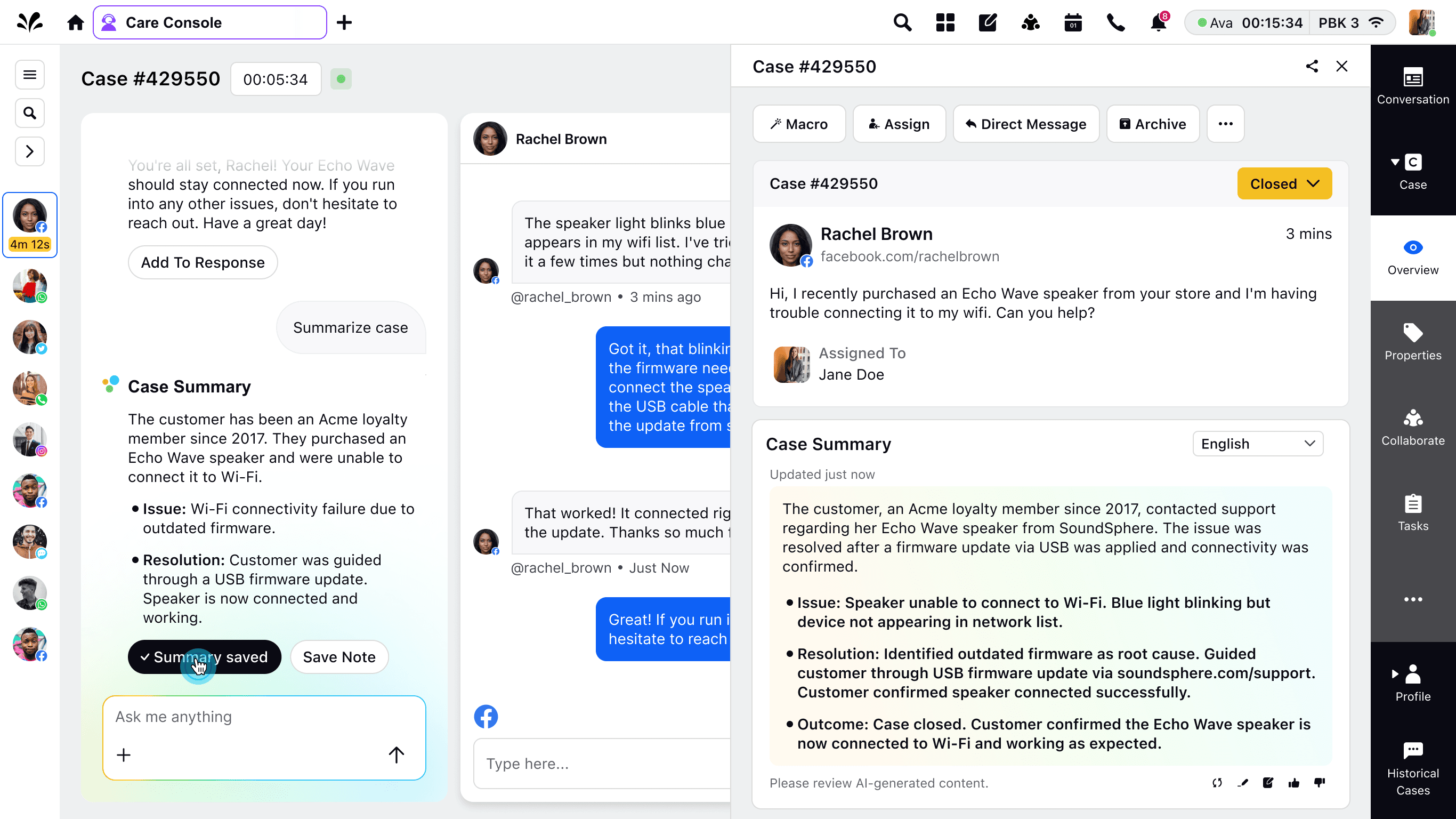
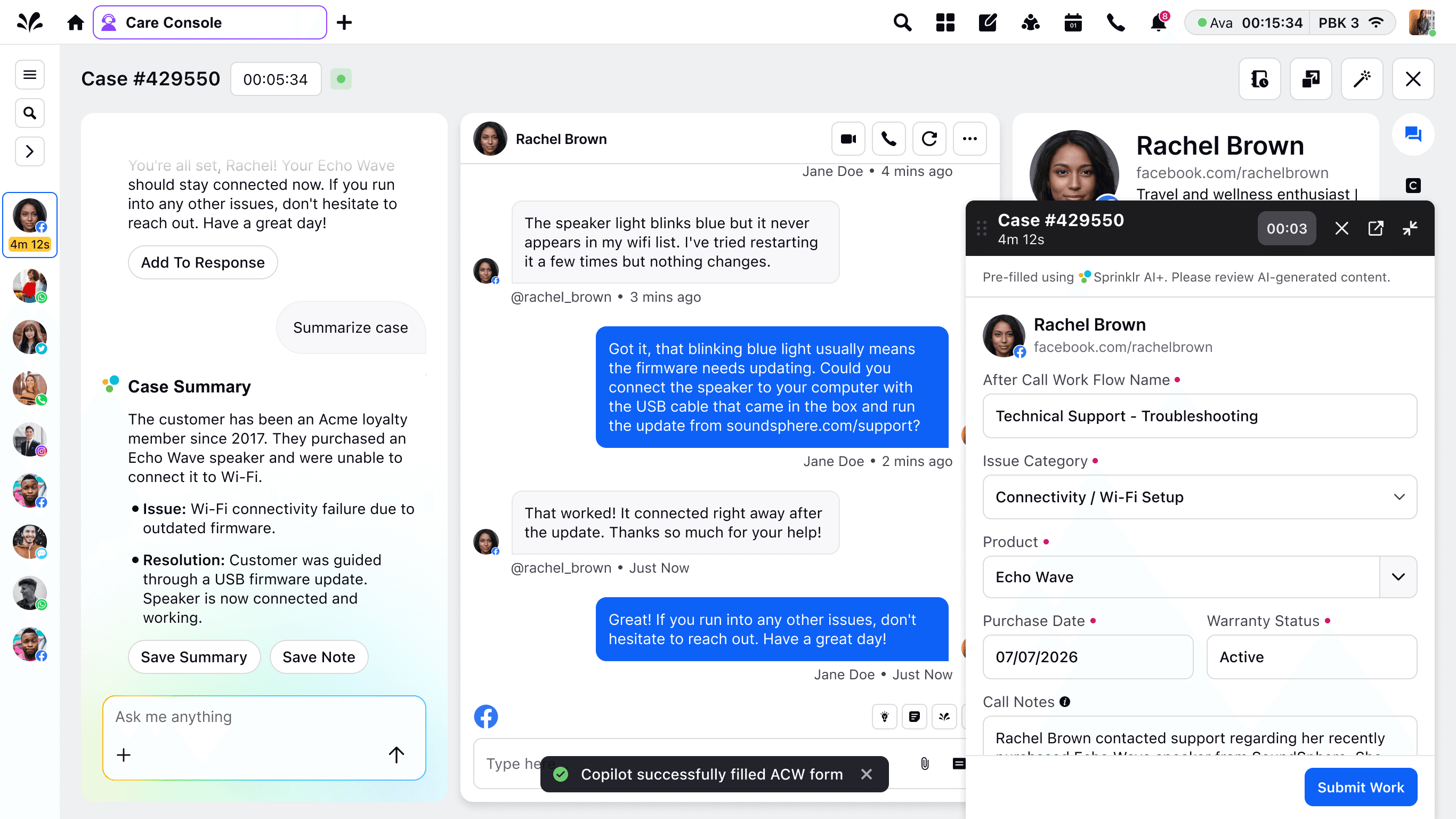
At the end of a case, the agent can ask Copilot for a summary, then review and record it with one click. Copilot also pre-fills the after-call work (ACW) form from what it observed during the conversation, and the agent reviews and submits.
Copilot is integrating more of the surrounding workflow
- Proactive task creation: Agents used to spend time creating follow-up tasks. I designed the interaction for how copilot would detect and start creating a task for the agent. Since agents are typically responding to customer or have other external tools open, the streaming and the gradient border is meant to capture their attention.
- Upsell opportunities: Agents are expected to catch opportunities to upsell to happy customers. But in a live conversation they often forget. I designed this interaction and upsell template for copilot to surface relevant offers at the case resolution point, when customer satisfaction is high. This feature maps most directly to brand revenue.
Added a little celebratory animation for the pitched state, to encourage agents to use this upsell opportunity more often.
Play with it yourself!
Designing AI disclosure across the platform
A little outside of Agent Copilot, but an interesting problem: we needed AI disclosures across every touchpoint on the platform. I grouped these touchpoints into two categories: AI-native and AI-augmented.
For AI-native touchpoints, such as Copilot panel, people intentionally enter an AI experience and the UI already reads as such with the AI branding. I used a light, persistent disclaimer at the bottom for these areas.
For AI-augmented touchpoints, such as smart-response list, ACW forms, AI is folded in standard product surface. These do not have any AI branding, and the user is usually about to act on the content. So I placed disclosure before the user makes a decision and added a subtle branding of Sprinklr AI.
I am exploring new patterns for AI interfaces and documenting them in my AI patterns note. I would love it if you took some time to check it out and play with the prototypes there!